
We’re taught from an early age that a story has a beginning, a middle and an end. Well, certainly all stories have a beginning … the first sentence. And they all have an end.
But does the journey and the end have to be the same in all instances? What if the reader or viewer could make [[choices]] along the way which resulted in a different end?
This is the route taken by the ‘make your own adventure’ type of story where the reader had to make a choice at the end of each page which then provided the instruction to ‘go to page ….’ from where the adventure would continue.
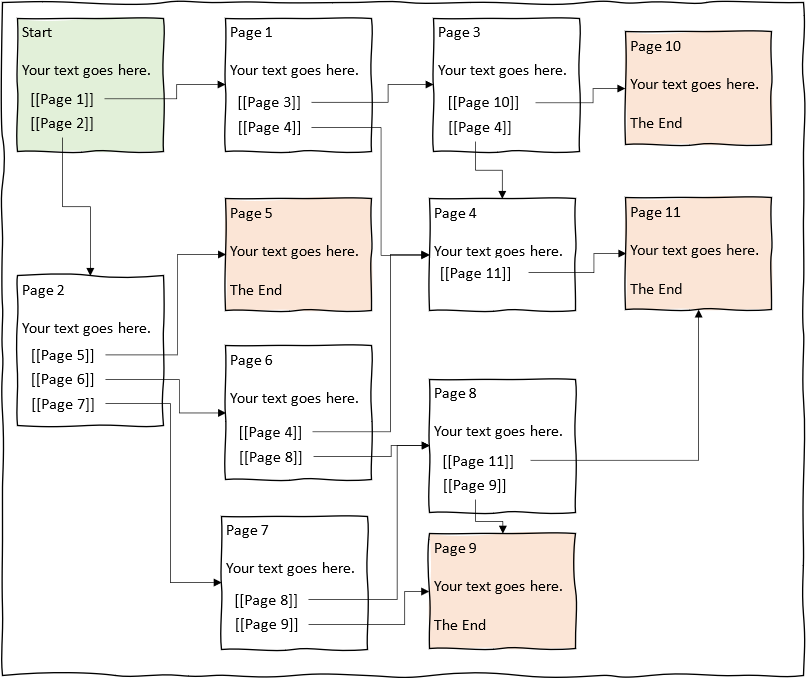
And what if you could produce such a story in a digital form that required no software to be installed on your computer (if you didn’t want to) and no coding skills other than being able to place a double bracket either side of each choice (as in the diagram below) but would work on any device?
”Want to learn more?”
[[Learn more <- Yes please, I’d love to learn more]]
[[No thank you, I’m not interested and wish to leave -> Not learn more]]Brilliant!
Whilst Twine is a computer application, you don’t need coding skills to create simple stories.
[[Where can I find Twine?]]That’s a shame but no worries. Simply click below to leave this page and return to the website home page.
If you’re ever tempted then simply return to this post and find out about this wonderful free tool.
[[Actually I’ve changed my mind and would like to learn more ->Learn more ]]
(link: “Exit to the Library website home page”)[(goto-url: ‘https://bvcl.org.uk/’)]Twine is a ”free” application which you can find at https://twinery.org.
When you arrive at the page you can decide to:
* [[use the content directly online using your preferred browser->online]], or
* [[download the current version to your device->download]].You can use Twine directly on your browser.
On the home page select the ‘use it online’ link.<br>
<img src=”https://bvcl.org.uk/wp-content/uploads/2021/08/TwineOnlineLink.gif”><br>
This will take you to a tutorial which you can skip if you wish.
From here you can create your Story right in your browser.
You do not have to do anything to save your Story, just close the browser.
When you return to twinery.org later and use the online link your Story will be there.
The only thing to remember is that your Story will be lost if you clear your cookies. If you can, [[download Twine to your desktop->download]] and use it from there.
[[Return->Where can I find Twine?]]
[[How do I create my first story?->Create your first story]]You can download a copy of Twine to your desktop.
On the home page select the link appropriate for your operating system.<br>
<img src=”https://bvcl.org.uk/wp-content/uploads/2021/08/TwineDownloadLink.gif”><br>
This will download an executable file which you can use to install the application.
From here you can create your Story and know that it will be saved on your device.
You do not have to do anything to save your Story, just close the browser.
When you return to twinery.org later and use the online link your Story will be there.
[[I’d rather use it online->online]]
[[What do I do when I’ve downloaded it?->Create your first story]]What would have happened if:
* Little red riding hood did not meet a wolf but a horse?
* Sherlock Holmes missed a clue?
* Batman did not think the joker was a criminal but an ally?
Choices do not have to be logical but they will usually have consequences; some good, some bad. Which is why there may be more than one ending to the story.
Choices reflect the author’s imagination and can surprise the reader.
[[Return->Start]]Once you’ve clicked the link to create your first story
<img src=”https://bvcl.org.uk/wp-content/uploads/2021/08/storyButton-e1628018275797.png”>
all you have to do is type in your story text and then, for any choices you create, simply enclose the choice text with closed square brackets `[[ ]]` and your new page will be created (note that Twine calls pages ‘passages’ … it merely means a blank space).
Please note that what you type in between the brackets is what will appear as the title of the next page.
There is, of course, much more that you can do with some simple coding when you get used to it, but for now all you need to worry about is creating a page of text and some choices (much as I’ve done here to provide this introduction!).
A very useful introduction can be (link: “found here”)[(open-url: ‘http://catn.decontextualize.com/twine/’)] (opens a new browser window) or
(link: “return to the BVCL website”)[(goto-url: ‘https://bvcl.org.uk/ever-thought-of-writing-an-interactive-story/’)]
The diagram below is an example of a story that branches from choices on each page. Simply remember that each page must have a unique title (using exact spelling and lettercase).
In this example there are four different endings (pages 5, 9, 10 and 11).
You’ll also notice that some pages only have one link rather like a next button (e.g. page 4 to page 11) and some pages can be linked to from more than one other page (e.g. page 4 and page 8).
You can find instructional tutorials on YouTube and details in the Twine Cookbook – but I’d keep things simple to start with.
Have a play around with Twine. See where your imagination takes you. Who knows, we may introduce a competition for different age groups!!